For everyone at home: the prayers
Next athan and countdown
The next prayer and the time left are always in view, with the Hijri date and the moon phase. The day’s arc runs along the bottom from Fajr to Isha.
The athan at each prayer
Tick the prayers that should play the athan and choose a reader for each. “Listen first” plays a reader before you choose. The default reader is free; more readers come with the unlock.
Reminders before prayer
A soft chime from 5 to 60 minutes before each prayer, set per prayer, so everyone has time to get ready.
Iqamah and Jumu’ah times
Optional and off until you turn it on. Set each prayer’s iqamah as minutes after the athan or as a fixed time, plus up to three Jumu’ah times. The next iqamah shows under the moon.
Prayer times are calculated from your city and the calculation method you choose, and may differ from your local mosque. Choose the method and Asr setting your mosque uses, and check with your local authority, especially for fasting. Read the disclaimers.
For learning together: Quran and hadith
A verse and a hadith on screen
A verse of the Quran and a hadith in Arabic, with a translation in your language where one is available (otherwise in English, and it says so). Long texts stay on screen until they can be read.
The Names of Allah
At the start of each minute, one of the 99 Names of Allah, then the verse or hadith returns.
Quran reader and player
Read the Quran on screen for free. With the unlock, listen with a choice of reciters.
Scholar quotes
With the unlock, short quotes from scholars join the rotation. Each kind of text can be turned on or off, with its own time on screen.
For every room and every age
Easy to read, easy to use
Large, clear text you can read across the room. Every setting works with the arrow keys and OK on the TV remote.
11 languages
English, Arabic, Turkish, Urdu (in Nastaliq script), Hindi, Bengali, Pashto, Dari, Spanish, Somali and Indonesian. All but English are early versions and say “(beta)”.
Your city, your method
Press “Find my location” for a suggested country and city; you always check them before anything is saved. Pakistan, India, Bangladesh and Afghanistan start with the Karachi method and Hanafi Asr. You can change both.
Arabic fonts
Amiri by default, or Reem Kufi, Scheherazade New, Noto Naskh, or Auto to change with each verse.
Calm in the home
Sound only when you ask
When the TV switches to another app or loses the internet, all sound stops. It never starts again by itself: you press Play.
Quiet nights
Sleep dimming at night, and a dhikr screen saver: by default from 01:00 to 05:00, or at hours you choose, or any time the TV is left alone. Any button brings the screen back.
A monthly calendar
The prayer times of the whole month on one screen.
Smooth on older TVs
A Lite mode keeps slower TVs smooth, and turns on by itself when needed.
Backgrounds
Shuffle all photos is the default. Choose a group (holy places, nature or desert caravans), a single photo, or the built-in dunes. The pictures are artistic illustrations, not photographs of the places.
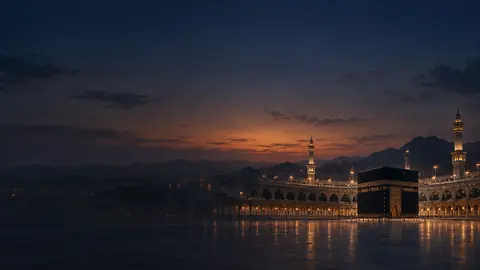
Holy places: the Kaaba at dusk 
Holy places: the Prophet's Mosque 
Nature: stars over the dunes 
Nature: a lake
One license for your home
Install the app on each TV in your home. One license covers up to 3 TVs in one home; for more TVs, add another license. Each TV is set up on its own and runs on its own, so two TVs can show a different verse or hadith at the same moment.
Always free on every TV
- Prayer times
- Next athan card
- Hijri date
- The athan at prayer time, with the default reader
- Daily Quran verse and hadith on screen
- The Names of Allah on screen
- Iqamah and Jumu'ah times, if you turn them on
One payment for your home
- Quran audio player (reading the Quran on screen stays free)
- Scholar quotes feed
- All athan readers, chosen per prayer
- Reminders before each prayer
- Photo backgrounds and shuffle
- All Arabic fonts
- Dhikr screen saver
Try all of it free for 7 days on each TV. One unlock covers up to 3 TVs in one home.